Autumn Heritage Apple Tasting

After a lovely Autumn Equinox, I had a vigorous start to the fall, kicking it off with a full Saturday. First, an early morning race at the Toronto Zoo where I ran 10km in about an hour, then a visit to the Spadina Museum near Casa Loma for a heritage apple tasting hosted by the lovely Suzanne Long.

At Spadina, the gardens and orchard were beautiful, and the apples plentiful. There were two long wooden tables covered with plates, hand-labelled, and ordered on one side by generation (ye olde small French St. Lawrence begat McIntosh, who begat Cortland, fathering Macoun and Spartan also…)
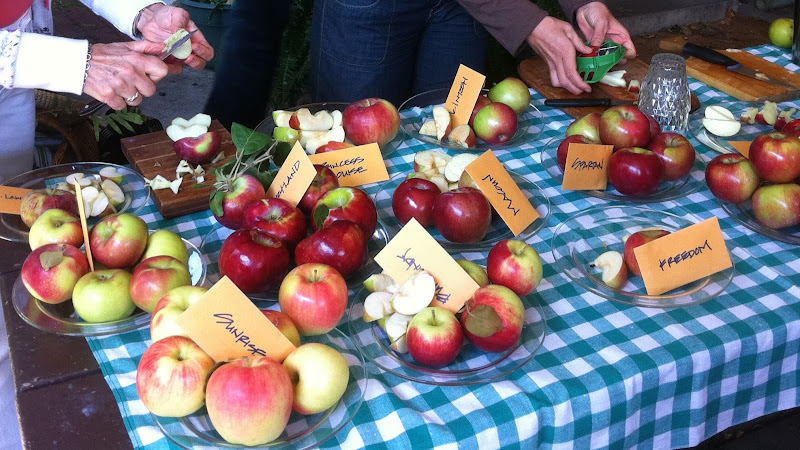
…and in a more eclectic grouping on the other side by age and family, dominated by russets and other peculiarities including a pink-fleshed crabapple hybrid (the Pink Pearl). So many great names! Sunrise, Baldwin, Burgundy, Freedom, Golden Reinette, Gravenstein, July Tart, Jefferis, Tolman Sweet…
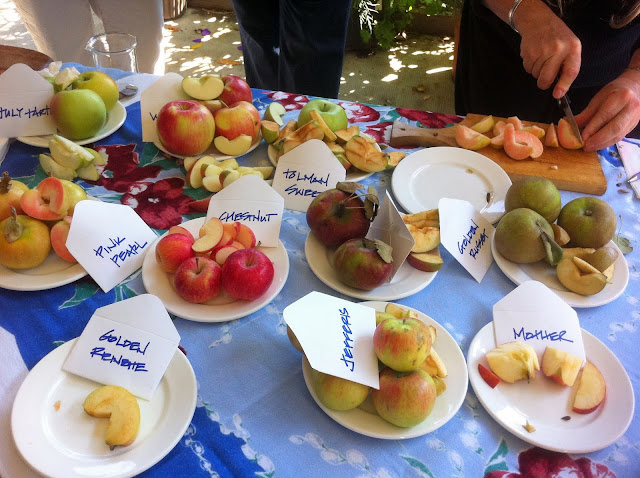
Many of the varieties in attendance were on the endangered apples list: sadly, since commercial farming is all about maximizing yield, the diversity of breeds is dying out, and many apples are disappearing not just from marketplaces, but from existence.

Think: when was the last time you went to your local Sobeys, Loblaws or Metro and saw more than the usual 10 standards? (Red or Golden Delicious, Granny Smith, Macintosh, Gala, Pink Lady, etc) One hundred years ago, North America sported over 15,000 apple varieties; now, only about 3,000 varieties still exist and most of those are endangered.

At the tasting, I heard stories from people who are friends with small orchard owners, saying that lots of local farmers are chopping down stands of Russets because they’re too hard to grow commercially. Extreme sadface. I love Russets.

Some of the more obscure varieties we tried were, alas, some of the tastiest. On the Macintosh table, there was an old parent-of-Macs variety that was described to me as “something you’ll never taste again”: the Princess Louise apple was a sensory delight – sweetly perfumed, crisp, with a rich honeyed flavour made all the more poignant by its rarity.
Before I select the pick of the crop, I should give a disclaimer: not only do I love Macintosh apples, I adore all apples, and could eat them until I have a full-on bellyache. There is no stopping me with apples. I have a witness to the fact that, after eating apples for two solid hours at the tasting, I went home and had TWO slices of apple tart for dessert. True story.

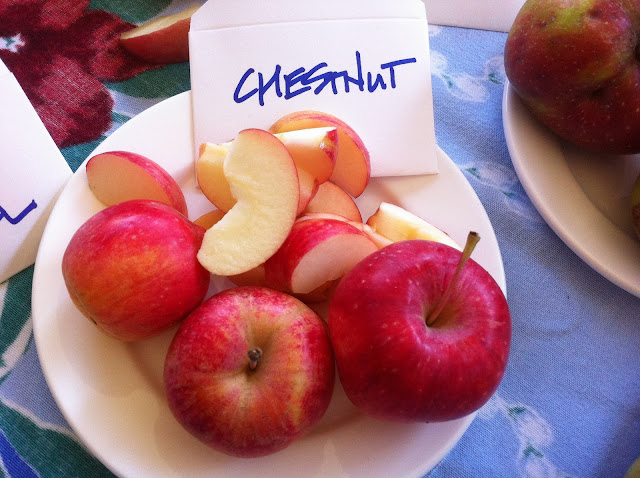
My favourites of the day were Mother, a rich red beauty with a cream-coloured interior that had a bright, snappy sweet flavour, and Chestnut, another rare find, a crabapple with an edible, nutty-sweet flesh. The Chestnut was hardly bigger than its namesake, a glowing ruby red on the outside and a warm yellow on the inside. I could have eaten the whole plate.
As LeVar Burton would say, “you don’t have to take my word for it.” There were food bloggers a-plenty in attendance, snapping photos with cameras that were far superior to mine. Here’s a list of some other Toronto writers who might have covered the event, go check out their opinions of the tastiest pommes:

Feeling left out? Wish you were there? Don’t despair! As Yoda would say, “there is another.”

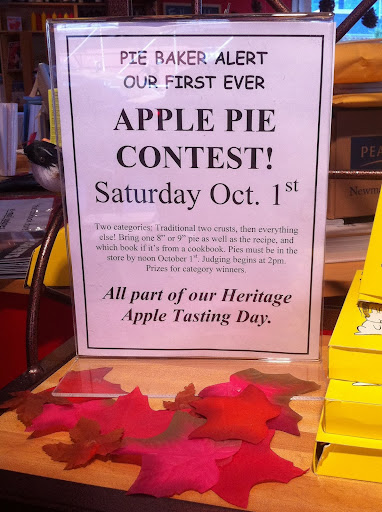
Another heritage apple tasting event coming up, that is! Yes, great news; Toronto’s own Cookbook Store at 850 Yonge Street (Yorkville) is holding a combined heritage apple tasting and apple pie contest on October 1st. I will, of course, be competing in this baking competition. If you choose to enter, be forewarned: you will be throwing down against Moi. I HAVE PUFF PASTRY AND I’M NOT AFRAID TO USE IT.
Novel Writing Software: Yes, there’s an app for that

Being the huge nerd that I am, I assumed that there had to be a modern-day alternative to writing a novel by scribbling with a pencil in a notebook by candlelight (although I still enjoy that method), or hammering at a typewriter by the glow of a 40-watt lightbulb (like that one, too).

Switching from PC to Mac about 4 years ago opened my eyes to a wealth of new software options, exposing Microsoft’s Office suite as NOT the ultimate device for electronic document creation.

Pencils: the digital alterative

So, what did I discover?

The App Store has a bundle called “Apps for Writers: from Scribbles to Stories”, which was a good starting point for research. Of course, it only showcases Apple’s selected options, but I liked the categories it used to organize the types of apps you may need to write, and have organized this post along the same lines, adding a fifth category for digital library organization: e-book readers, online reviews and virtual book catalogs.


  1. Manuscript Makers
  2. Distraction-Free Writing
  3. Journaling & Blogging
  4. Notes & Clippings (aka Research)
  5. E-Reading and Library Organization

1a) MANUSCRIPT MAKERS (Books/Stories): The big players in the manuscript creation game are Scrivener 2.1 (created 2006), Ulysses 2.0 (the original, created 2003), StoryMill 4.0, Mellel 2.9 and Pages ’09 (really a layout tool for image-heavy text, but created by Apple, so obviously promoted heavily by them). These programs cost between $20-50.

Scrivener logo
Scrivener logo
I used the trial versions of several, watched the demo videos, and read the manuals for these programs and a few more, and in the end there was a clear winner: Scrivener!

I was so impressed by Scrivener‘s toolset that I shelled out the $45 immediately and bought it.

What can it do?
What CAN’T it do!

I love the:

  1. Corkboard view, that lets you organize digital index cards,
  2. Ability to split your text into chapters and scenes and then drag and drop them to change the order of your story as needed,
  3. Full-screen editing,
  4. Editable templates for setting locations and characters,
  5. Word count and word target options,
  6. Metadata tools that let you build collections to follow the plot of a single character or family, or tag stuff as “draft” or “finished” and then see only chapters that need work,
  7. Autosave and backup tools that work with Dropbox or any other virtual service,
  8. Floating quick-reference panels, if you need to check a photo or document for reference while you write,
  9. “Snapshot” tool that lets you create a version and then rollback changes or compare revisions,
  10. Powerful compile function, that can build you an e-book, or a totally correct thesis with footnotes,
  11. Awesomesauce.

… seriously, this thing ROCKS. And no, I swear I do not work for these people, nor am I being paid to endorse them; I’m just really into their stuff.

Added Bonus: If you’re anal like me, and you want to build a timeline to keep track of historical events of significance and milestones in the lives of your characters, then StoryMill might seem to be the only option, as it is one of the only programs I’ve found with a built-in timeline option. However! The Scrivener forums have given birth to a beta program called AeonTimeline. It’s free, in active development, and can be exported to rich text, image, HTML table, or OPML which is Scrivener-compatible. Ta-da!

1b) MANUSCRIPT MAKERS (Scripts): If you’re writing a screenplay, the options are limited. Really, there’s just one contender: Final Draft is costly at $250, but is far more than just “the industry standard”, it is worshipped. They drop big names in the promotional material (Oliver Stone, Tom Hanks, Alan Ball, J.J. Abrams and James Cameron all use it), but the real selling point is that in order to be taken seriously, you must submit your manuscript in FinalDraft (.fdx) format. Other options do exist, to provide different views on scriptwriting or to get the job done for less money. Montage is just $50, fairly mature at version 1.5.4, but has not been updated since Feb 2009. Scrivener has a template for screenwriting, as well as several other scripting options for comic books, etc, but even they tacitly acknowledge the supremacy of Final Draft, as their scripting option compiles into .fdx format.

2) DISTRACTION-FREE WRITING: If you don’t want to shell out the $40-50 for a full-throttle manuscript program, but you want a more zen experience than using Microsoft Word, Google Docs, or TextEdit, you can consider the “Distraction-Free Writing” options. These include $5 for WriteRoom, $10 for ByWord, $5 for OmmWriter, $5 for iA Writer, $1 for CleanWriter… meh. Frankly, if you want distraction-free writing, I suggest turning off your wifi. Seriously, these programs can only help so much. Spend the money on a proper manuscript maker instead.

3) JOURNALING & BLOGGING: I simply cannot understand why you would bother blogging with an app when there are so many free, web-based options available. WordPress, Blogger, LiveJournal, Tumblr. Seriously, why pay $10 for Day One, $15 for Memoires, or $30 for Chronories? Okay, that last one is weird, actually. It’s for lazy people who want to blog without blogging, and kind of want to… stalk themselves? Listen, that whole concept of auto-generated diary entries freaks me right out, so I’ll just pretend it doesn’t exist and we can move on. ‘

Evernote logo
Evernote logo
4) RESEARCH (NOTES & CLIPPINGS): Again, you COULD pay $50 for DevonThink; $40 for Yojimbo, Together or EagleFiler; or $20 for Nottingham or MindNode Pro. Hell, you could go insane and pay $250 for Tinderbox. But why? There are some stellar free alternatives out there.

Personally, I use a combination of Wunderlist for task organization and deadline setting (try it, it is INCREDIBLE), Evernote for gathering clippings while surfing the web and organizing them into neatly tagged, easily searchable notebooks, and Dropbox for backups and large document sharing. Skitch is also a great little free tool for grabbing digital images or screenshots when you need them.

5) READING and LIBRARY ORGANIZATION: This may not seem crucial to writing, but I assure you it can be. While I’m a devotee of printed, paper, bound books, I acknowledge that a benefit of having digital versions is a writer’s ability to dissect and learn. You can search for instances of a name, a word, clip scenes and review their structure, word count, etc.

I don’t have an e-reader, but I do use e-book software on my laptop and iPhone for this purpose. Most people know about the free Kindle and Nook software, but I submit for your consideration a little-known but very impressive open-source alternative called Calibre. With this, you can organize a library of e-texts, tag them, sort by author, title, add metadata for series, publication date, change the book cover, explode the e-pub and fix typos, search across multiple vendor sites like Amazon, Kobo, eBooks.com, Waterstones, Gutenberg and so on to find the cheapest version of a book. It’s excellent.

Goodreads logo
Goodreads logo
For cataloging books on your shelves, searching for editions of older or obscure books, and getting great reading recommendations by comparing your library to those of people with similar tastes, I use LibraryThing.

For finding a wealth of reviews of books you’re considering reading, I recommend GoodReads.


PS – If after all this you can still stomach further musings on the subject, I found this blog post by Antony Johnston to be quite good. He provides additional useful content such as templates and examples of drafts created with some of the writing software I mention here.